
Zeekit Platform / Fitting Room
Desktop And Tablet
Project Background
Zeekit, a company focused on virtual clothing, created a platform that provides a virtual display of clothing and accessories of various brands by using an existing photo pool of professional and non-professional models. This platform allows brands to save money and other resources related to photoshoots.
The platform is intended for companies only and not for private users.
The platform offers an automatic technique allowing companies to present clothing items quickly and easily without additional involvement.
The user undergoes a three-stage process:
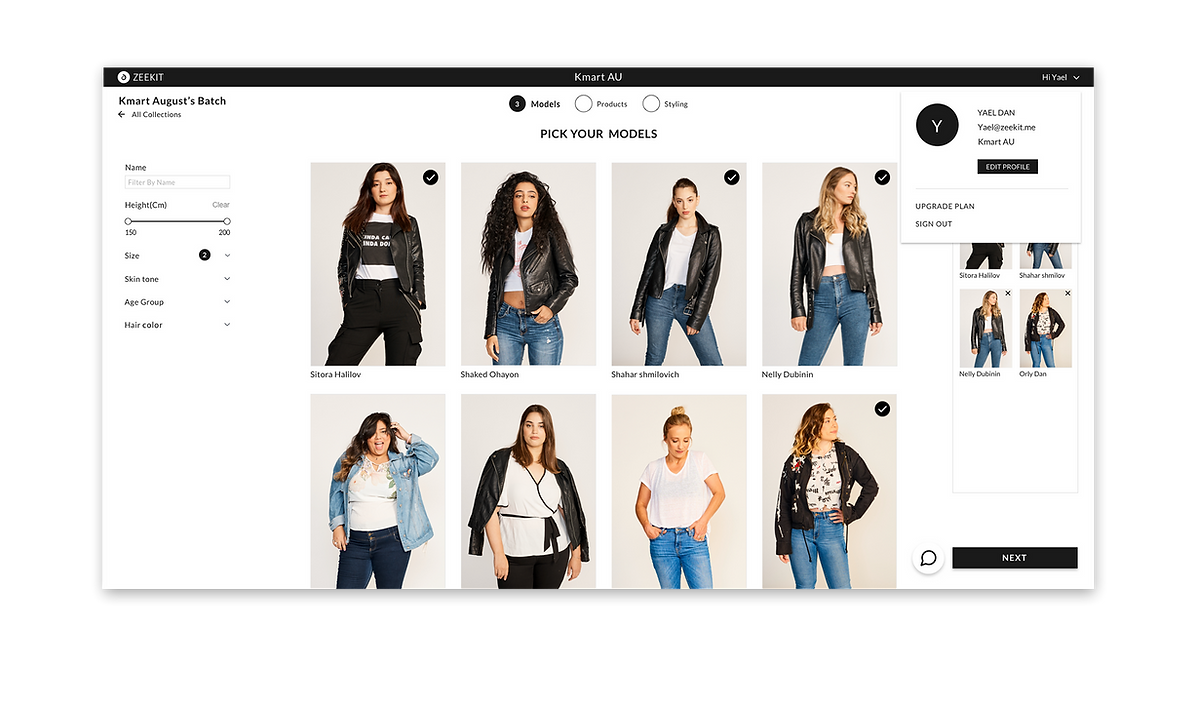
Stage 1: Selecting models from a large existing pool of pictures.
Stage 2: Uploading clothing items and accessories that the user wants to advertise.
Stage 3: Styling the clothing and accessories.
The result is a pool of pictures of various models of all sizes and a variety of clothing combinations.
My Role:
UX / UI Designer, Visual Designer
Tools:
Sketch, Principle, Photoshop, Illustrator
Date:
January 2019
Goals and Objectives
-
To create a user-friendly site, enabling the user to perform all actions independently on the computer.
-
Using the platform will save the brands’ money and resources usually spent on photoshoots, model fees, etc.
-
Providing an equal opportunity to a wide variety of real people – and not only professional models – to join Zeekit's pool, who hope to be discovered and become models.
-
An ample supply of models.
The Problem
The main problem with the platform is the broad range of actions that the user must understand and perform to achieve the desired result.
For the user to be able to use the platform without having problems in understanding or completing each stage, the platform must be clear, easy to understand, and as simple as possible.
The Result
The design is minimalistic and straightforward, which helps the user to focus on the main task.
The user understands what needs to be done simply by looking at the page.
The site consists of three stages, all of which are easy to understand and operate. The user receives detailed and straightforward instructions by email. The instructions are displayed in a three-stage structure that corresponds with the platform so that the user feels this is a familiar environment and knows where everything is located.
Filters
User’s Activity Area
Result
Next Steps
-
At the moment, the platform only allows the use of static pictures. The future goal is to integrate the Mix and Match and Collections options that the app offers (the ability to change the clothes that the models are wearing and see many possibilities simultaneously).
-
To design a system in which models can create their profiles, represent themselves, and try to be hired as company models.

User Personas
I created User personas using my research as a base and defined the user needs, goals, motivation, and pain points.


Site Map
Relying on my research, I created a site map to organize the structure of the Platform and have a visual representation of the screens and how they relate to each other.

User Flow
I created user flows that show the different entry points and steps for the user to take in order to complete a task within the Platform.

The Result / The Final Product
Welcome page
After registering and receiving instructions by email, the user lands on this page that contains a video clip describing the site’s stages and how to use it.
Models
Goal
Selecting models quickly and conveniently.
Problem
The problems I have encountered while designing this page:
-
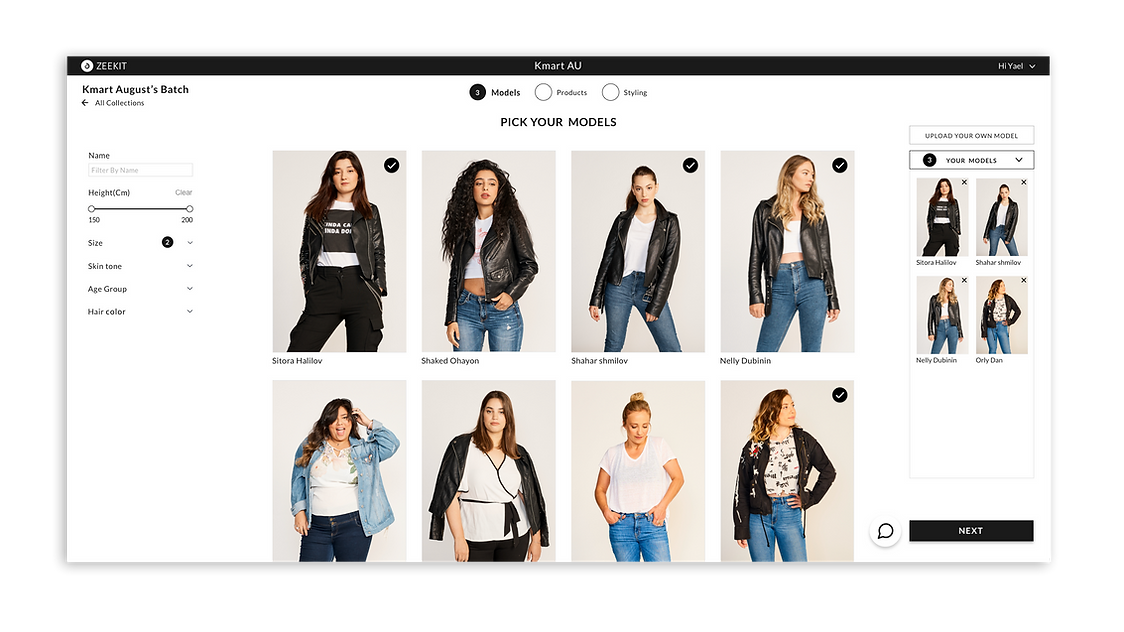
The large variety of models requires the user to spend much time seeking a suitable model based on several parameters, such as size, height, skin tone, age, etc.
-
The need to see one's selections quickly and in a centralized fashion without scrolling.
Solution
-
When the user hovers over a model’s picture, basic details about her are displayed. To see more information and pictures, the user can click View Model.
Also, there are filters on the left side of the page that help the user choose the models.
-
All the user’s selections appear on the righthand side of the page in a centralized manner, so that they can be seen with no need for scrolling or searching. In addition, the user can delete selections according to his/her wishes.


Upload Your Own Model
The Upload Your Model button is designed for companies interested in adding their in-house models. Clicking this button opens a pop-up window requesting to verify the user’s email address, thus allowing Zeekit to contact the company and proceed in the process.


Products/SKUs
Goal
Uploading all the products that the company wants to advertise. Tracking the products (tracking their status).
Problem
The system cannot support all the items for two main reasons:
-
The picture’s size or resolution is incompatible with the system.
-
A few types of clothing and fabrics do not look good on the models.
Solution
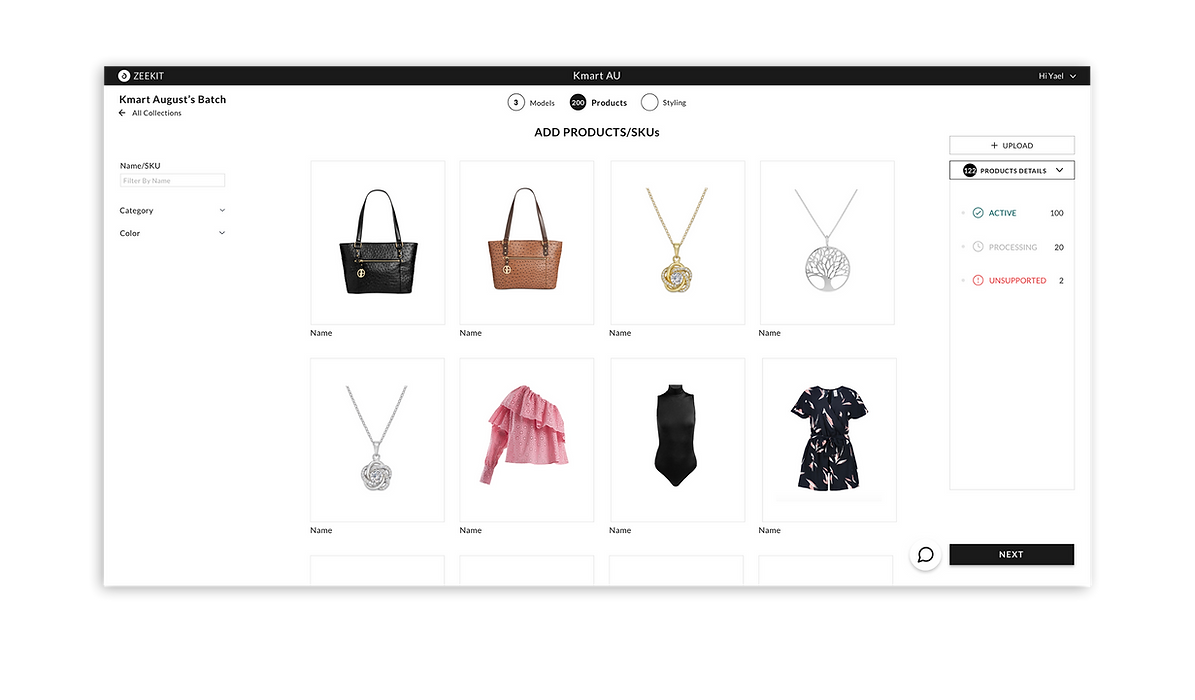
1. When the user uploads the items, a pop-up window will appear. A checkmark (✓) will be shown near an item that will be uploaded to the website because its size and resolution are compatible. Items that will not be uploaded due to incompatibility will be marked by an ,and the specific reason for this will be displayed.


2. Certain types of clothing and fabric will not look good on the models. Therefore, the items are divided into three categories:
-
Active: items that have been uploaded and look good.
-
Processing: items that are still being processed and will be uploaded later.
-
Unsupported: items that are unsupported by the system and will not be uploaded for various reasons. Sometimes the problem can be solved, and the item can be uploaded according to correct instructions. The reasons for failed uploading will be displayed when the user hovers above View Product. Thus, the user can learn why a given product cannot proceed in the input process and how the situation can be improved.

Still Processing
Still processing: a notification for the user that the items are not yet ready for the styling page and, therefore, cannot be styled.


To style clothing and accessories as conveniently as possible.
Styling
Goal
Problem
-
While avoiding visual overload and maintaining maximum convenience, how can the platform optimally present clothing and accessories that have been selected from the general pool?
-
What tool should be developed to allow the user to create combinations of clothing items and accessories easily?
-
How can the user erase the selected clothing items easily without using filters?
-
How can the user see all the models that were selected?
-
How can the user see all the model's poses?
Solution
-
The clothing items are presented near the filters for the user's convenience; thus, the user can access the desired items quickly. Clothing items are displayed next to the models so that both can be seen simultaneously.
-
The box located next to the model displays the categories and accessories that can be inserted in the platform, thus showing the user's selections and the way they are combined. There is a delete option that can be easily applied by clicking the X above each garment.

-
The Models button presents all the models that the user has selected, wearing the selected clothing. The user can switch the models and thus see the clothing items on all the selected models.
-
Each model displays several interchangeable poses.


My Collection/Dashboard
Goal
-
To concentrate all collections and as many details as possible about the collection on one page without requiring additional action.
-
To provide an option for a plan upgrade.
Problem
To design the page so that it displays many details while avoiding visual overload.
Solution
1. The user can see details and perform operations without entering the collection itself:
-
One can see all the user’s stylings and download them without entering the collection.
-
The name of a collection can be deleted and modified.
-
One can enter a specific page by clicking the page button.
2. Incorporating advertisements for a plan upgrade throughout the page.

Profile
This page contains three sections:
-
Basic information about the user.
-
Information about the company.
-
Plans and prices – three plans for a product upgrade.


Sign In
